.png?width=2560&quality=75&format=pjpg&auto=webp)
Security: Fortify Your Presence
An overview of why Security is the bedrock of digital trust.

TABLE OF CONTENTS
Even the fastest, most secure, and most accessible site in the world cannot build trust if your audience can’t find it. In a landscape increasingly dominated by AI-driven search and sophisticated algorithms, being "findable" is a core component of digital reliability.
The Oshyn Digital Trust Index evaluates this through the Discoverability pillar, which measures how effectively your website communicates its value and content to both human users and automated systems.
Discoverability is the bridge between your brand’s expertise and the user’s intent. It measures how well your site is optimized for search engines and, increasingly, for generative AI engines. When a website is highly discoverable, it provides clear signals about its authority, structure, and the relevance of its information.
In the 2026 Index, discoverability has evolved beyond traditional SEO. It now encompasses how easily information can be parsed by "answer engines"—the AI tools that users now use to summarize information without ever clicking a link. If your site is invisible to these tools, you lose the opportunity to be the source of truth for your customers.
To assess discoverability, we look at the technical markers that help search engines index and rank your content. Key metrics include:
In 2025, Discoverability sat outside the Digital Trust Index. In 2026, it earns a seat at the table — and the industry data shows why reach and reliability must be managed together.
Avg Discoverability Score 2026
New pillar — highest avg of any
Score ≥ 70
Strong performers
Score < 50
Low discoverability
Correlation w/ R-Score
Independent of reliability
The shift in how buyers research, moving from traditional search engines to AI platforms that generate answers rather than return links, has made discoverability a reliability question rather than just a marketing one.
Even the fastest, most secure, and most accessible site in the world cannot build trust if your audience can't find it, so being "findable" is a core component of digital reliability. However, in the 2026 Digital Trust Index, Health Care Equipment & Services led all industry groups in discoverability at 64.5 while posting the worst security score of any industry at 33.3. This means that these companies are easy to find, but also unsafe when found.
Discoverability joins the Digital Trust Index in 2026, and the industry data shows why reach and reliability must be managed together.
The average 2026 discoverability score lands at 59.4, making it the highest absolute average of any pillar. But with a correlation of only 0.21 with the composite R-Score, discoverability is confirmed as an independent strategic dimension: being found and being trustworthy are separate disciplines that must be managed together.
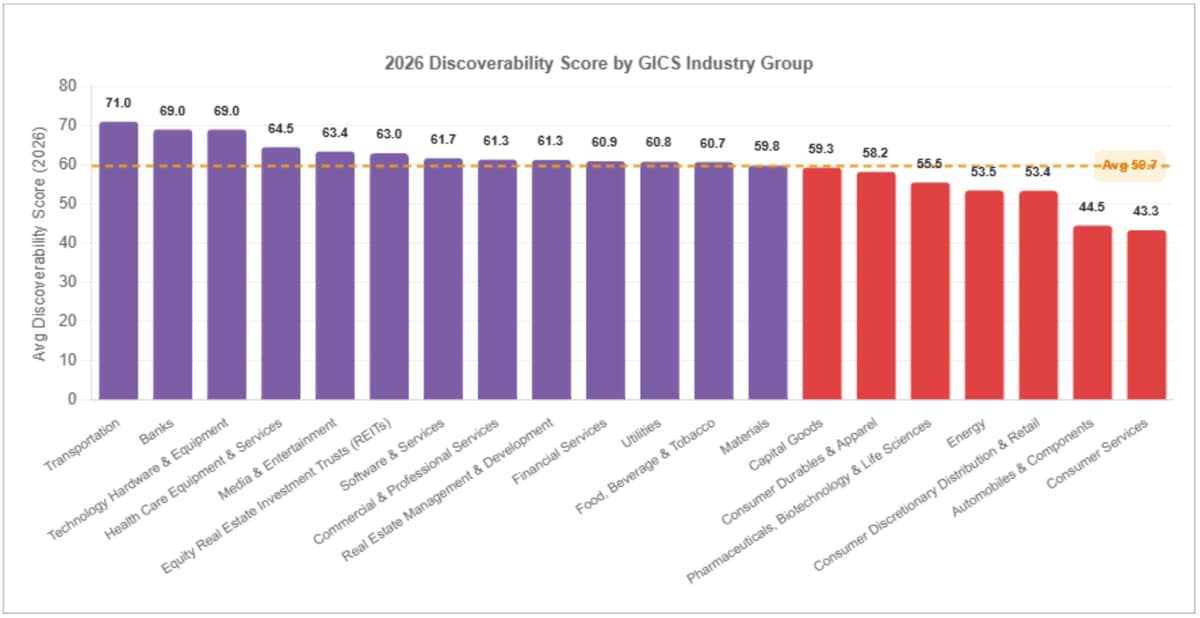
Health Care Equipment & Services leads discoverability at 64.5, followed by Media & Entertainment at 63.39 and Equity Real Estate Investment Trusts at 63.0. At the bottom of measured industries: Consumer Services at 43.33 and Consumer Discretionary Distribution & Retail at 53.38.
Health care and media companies lead discoverability because they actively invest in content infrastructure — structured data, XML sitemaps, canonical tags, and AI-indexable content are core to their digital model. Retailers at the bottom face a different challenge: Consumer Discretionary companies often rely on paid acquisition over organic discoverability, meaning their SEO and AEO infrastructure lags behind their ad spend. The 0.21 correlation between discoverability and R-Score confirms these are separate investment tracks — being found does not guarantee being reliable.
| Industry | Avg Discoverability Score | Avg R-Score | Avg Security | Discoverability vs R Gap | n |
|---|---|---|---|---|---|
| Transportation | 71.0 | 68.0 | 80.0 | +3.0 | 1 |
| Banks | 69.0 | 32.0 | 23.0 | +37.0 | 1 |
| Technology Hardware & Equipment | 69.0 | 55.0 | 45.0 | +14.0 | 1 |
| Health Care Equipment & Services | 64.5 | 51.8 | 33.3 | +12.7 | 20 |
| Media & Entertainment | 63.39 | 49.6 | 30.8 | +13.8 | 23 |
| Equity Real Estate Investment Trusts (REITs) | 63.0 | 43.6 | 39.5 | +19.4 | 7 |
| Software & Services | 61.69 | 51.9 | 53.7 | +9.8 | 16 |
| Commercial & Professional Services | 61.33 | 67.0 | 75.0 | -5.7 | 3 |
| Real Estate Management & Development | 61.25 | 51.8 | 37.0 | +9.5 | 8 |
| Financial Services | 60.92 | 53.7 | 42.2 | +7.2 | 50 |
| Utilities | 60.78 | 45.8 | 29.9 | +15.0 | 9 |
| Food, Beverage & Tobacco | 60.71 | 60.1 | 46.4 | +0.6 | 7 |
| Materials | 59.77 | 48.2 | 37.3 | +11.6 | 13 |
| Capital Goods | 59.28 | 50.6 | 42.2 | +8.7 | 439 |
| Consumer Durables & Apparel | 58.2 | 41.0 | 40.8 | +17.2 | 5 |
| Pharmaceuticals, Biotechnology & Life Sciences | 55.5 | 45.5 | 35.0 | +10.0 | 2 |
| Energy | 53.48 | 48.6 | 29.8 | +4.9 | 25 |
| Consumer Discretionary Distribution & Retail | 53.38 | 51.3 | 49.2 | +2.1 | 16 |
| Automobiles & Components | 44.5 | 35.0 | 6.0 | +9.5 | 2 |
| Consumer Services | 43.33 | 36.7 | 31.3 | +6.6 | 3 |
| Consumer Staples Distribution & Retail | — | 0 | |||
| Household & Personal Products | — | 0 | |||
| Insurance | — | 0 | |||
| Semiconductors & Semiconductor Equipment | — | 0 | |||
| Telecommunication Services | — | 0 |
* Discoverability vs R Gap shows how much discoverability leads the composite R-Score. The gap that must be closed by improving reliability.
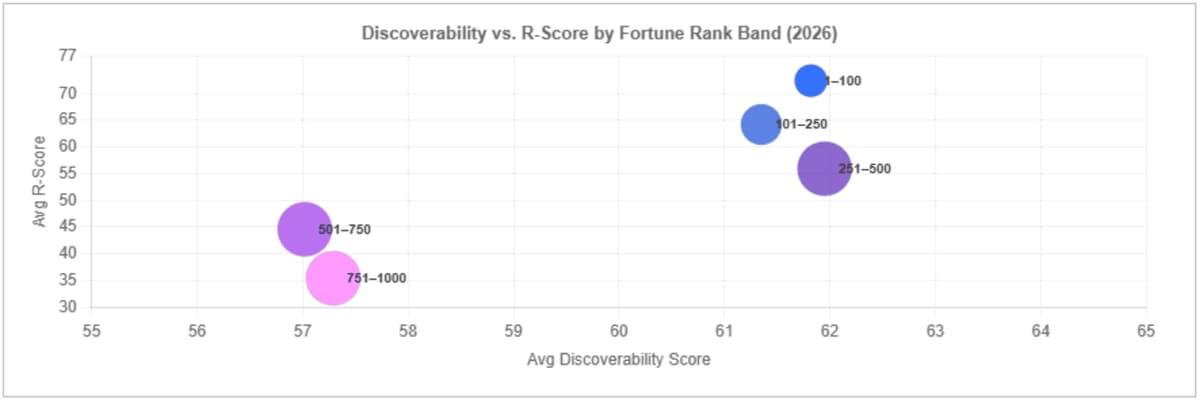
Discoverability is essentially flat across Fortune rank bands: 1–100 averages 61.8, 101–250 averages 61.4, 251–500 averages 62.0, 501–750 averages 57.0, and 751–1000 averages 57.3. The range is 5 points. R-Score over the same bands ranges from 72.4 to 35.4 — a 37-point spread. Large companies and small companies are nearly equally discoverable. They are not equally reliable.
The 0.21 correlation between discoverability and R-Score means reach explains barely 4% of the variance in composite digital reliability. Fortune rank predicts R-Score with a strong gradient; it barely moves discoverability at all. The implication is direct: organizations that invest in SEO and AEO expecting it to lift their R-Score are solving the wrong problem. Visibility is table stakes — it is now nearly equalized across the Fortune spectrum. What separates leaders from laggards is what users find when they arrive.
| Quadrant | Discoverability | R-Score | Risk | Strategic Priority |
|---|---|---|---|---|
| Trusted & Found | High | High | Low | Maintain and extend — protect lead in both dimensions |
| Found But Frustrating | High | Low | High | Fix performance, security, and accessibility before investing in more reach |
| Reliable But Hidden | Low | High | Medium | Invest in AEO and SEO — the trust foundation is solid, visibility is the gap |
| Struggling | Low | Low | Critical | Address core reliability first — reach without trust accelerates damage |
* Quadrant classification based on relative Discoverability and R-Score. High/Low thresholds set at the Fortune 1000 median for each dimension.
Improving discoverability requires a shift from keyword-focused tactics to high-quality, structured communication that satisfies both humans and machines. The gap between Telecom (72.6) and Retailing (59.2) suggests that enterprises with complex content estates are already investing systematically in governance. For organizations in the bottom quartile, metadata consistency and crawl efficiency are the fastest path to meaningful score improvement. Other tips include:
By mastering discoverability, you ensure that your investment in performance, security, and accessibility is seen by the people who need it most. To see where your organization's discoverability score sits against Fortune 1000 benchmarks, run a free Reliability Report scan.
Ensure your website is high-performing and trustworthy with Oshyn’s free AI-enabled Reliability Report. This comprehensive report delivers the same deep technical insights that Oshyn used to create its prestigious Digital Trust Index.
Start Your ScanAn overview of why Security is the bedrock of digital trust.
How sub-second load times correlate with brand reliability.
This explains the transition from "checking a box" to "inclusive UX."
What trends and observations were uncovered in this year’s edition of the Digital Trust Index? Read on to find out.
Whether you’re an established brand or rising through the ranks, we’ll help you identify—and fix—the specific friction points holding your digital trust back.
.png?width=2560&quality=75&format=pjpg&auto=webp)
.png?width=2560&quality=75&format=pjpg&auto=webp)